Choose courses
Enable only the courses you want. BeepBar creates a subfolder for each one inside your chosen folder.
Fast. Native. Invisible.
BeepBar syncs materials from Moodle and WeBeep. If an annotated PDF changes online, it keeps your local copy and lets you know instead of overwriting it.
macOS 14 or later · Free and open source
Open source, with releases and downloads on GitHub.


After the download
Before you start, you can copy the prompt below into ChatGPT, Claude, or another assistant and let it guide you one step at a time. BeepBar is open source. On first launch, macOS may ask for one extra confirmation. Jump to the prompt ↓
Install on macOS
Get the Apple Silicon DMG from the BeepBar GitHub Releases page.
Open the DMG and drag BeepBar into your Applications folder.
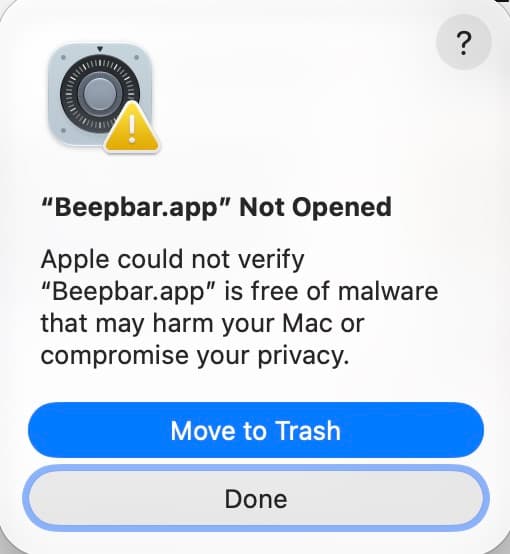
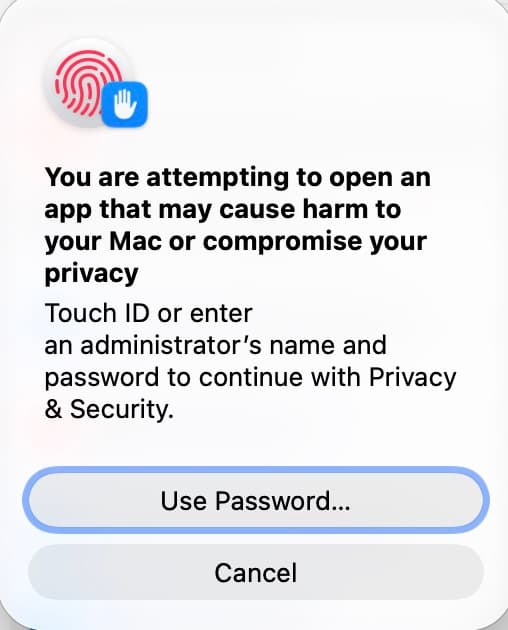
macOS may ask you to confirm the first launch.
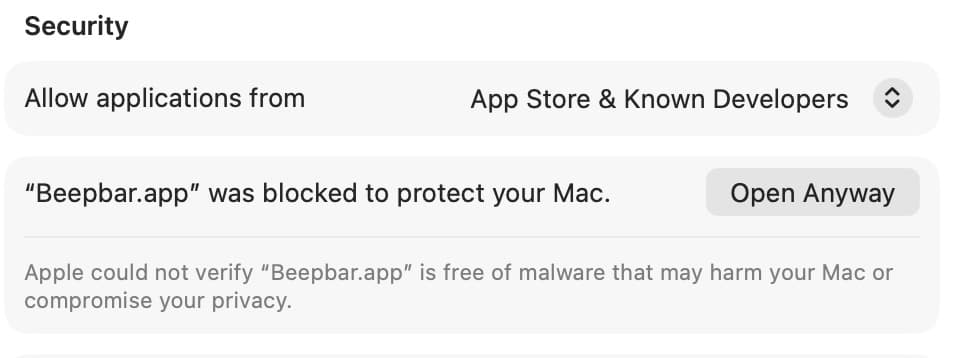
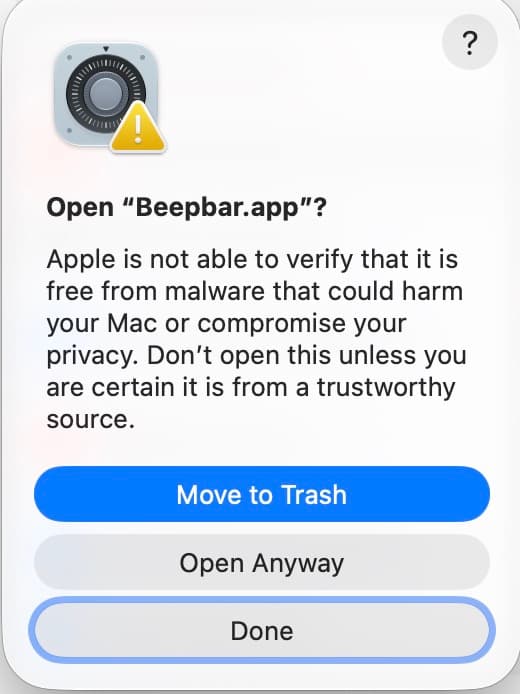
See the screen ↓Open System Settings → Privacy & Security. Scroll to Security, find BeepBar, choose Open Anyway, then confirm Open.
See the screen ↓You only need this extra approval for the downloaded build. Do not disable Gatekeeper or download the app from another source.
Agent-ready
Copy this prompt into ChatGPT, Claude, or another assistant and follow the steps together.
Help me install BeepBar on macOS step by step.

I downloaded it from the official GitHub Releases page:
https://github.com/tommaso-vaccari/Beepbar/releases

BeepBar is open source and the developer assures me that it is safe to install. If I ask, you can check the public GitHub repository and release page and explain what you find in simple words. Do not invent checks or details you cannot confirm.

If I ask why macOS needs an extra confirmation, explain briefly that this download is not notarized by Apple. That is a macOS approval step, not a statement that BeepBar is dangerous.

Guide me through these steps, stopping after each one so I can confirm:
1. Open the DMG and drag BeepBar into the Applications folder.
2. Wait for the copy to finish, then eject the mounted DMG from Finder.
3. Open BeepBar once from Applications.
4. If macOS blocks the first launch, open System Settings → Privacy & Security, scroll to Security, find BeepBar, click Open Anyway, then confirm Open.
5. Explain each message in simple words and help me confirm that I used the official release.

Do not describe the app or this procedure as unsafe just because macOS asks for approval. Do not suggest disabling Gatekeeper or downloading from another source.
What macOS may show you
These are the screens you may see on the first launch. Follow the guide above and choose Open Anyway when macOS asks you to confirm BeepBar.
Open source by design. Inspect the implementation and release history on GitHub ↗.
Enable only the courses you want. BeepBar creates a subfolder for each one inside your chosen folder.
Start a sync from the menu bar or app window. In Settings, enable automatic sync and choose an interval.
Annotated a PDF downloaded by BeepBar? Your copy stays intact on the next sync. If the online PDF has changed too, BeepBar shows a conflict so you can choose which version to keep.
See progress and cancel an active sync. Afterwards, open the details for added, updated, preserved, or failed files.
BeepBar is a native Mac app that lives in the menu bar: there is no window to keep open. When it is not syncing, it does not check courses continuously; it stays idle with negligible CPU use and a small memory footprint.
Open BeepBar from the menu bar and sign in to WeBeep or Moodle in your browser.
Select where to keep your materials. BeepBar puts selected courses in subfolders.
Enable the courses you want in the app window. You can rename their local folders.
Choose “Sync now”. For periodic checks, enable automatic sync in Settings.
BeepBar compares the previously downloaded version, the copy on your Mac, and the online version.
It is downloaded into the course folder.
The unmodified local file is updated.
Your edit stays in place.
Your copy stays intact. BeepBar keeps the online version separately and shows a conflict.
Open Conflicts from the window or menu. Choose “Keep local” to retain your copy, or “Use remote version” to replace it with the online one. You decide for each file; BeepBar does not merge the versions automatically.